Friday, September 26, 2014

LINKEDIN ROLE IN WORKDAY:Rolling out ESS and MSS...


How ‘LINKEDIN’ plays its role in Workday HCM: Rolling out ESS (employee Self service) and MSS (Manager Self service)

Let us discuss about ‘ Self Service’ in Workday and how Linkedin plays a part in Workday.

By giving access to your employees,workers in Workday and to the tasks and information. Access for their work and personal life, the Human resources, payroll and other groups are given the time they need to be a strategic influence.

Managers have the flexibility to run Analytics report, view dashboard and METRIC REPORTS on the Workday landing page and have data about their own direct and indirect reports at their fingerprints.
Rolling out ESS (employees Self service) and MSS (Manager Self service) can increase adoption of Workday throughout your organization.

PROFESSIONAL PROFILE: Workday delivers a professional profile that provides a user-friendly way to track key talent information about our self and others like Job history, education and feedback information from Workday’s talent management functionality.
We can configure a professional profile using the configure profile and configure profile group tasks.  It is better to add a professional profile as the first item in the overview or job profile group so that it displays first when viewing workers profile.
Ex: If anytime feedback is enabled, a worker can see his own feedback and co-worker can give feedback.

Workers can add, edit and remove their own experience, skills and education directly on their professional profile. We can use ‘ Import feature from LINKEDIN’ if we enable the task to import.
During the import process, Workday eliminates duplicate entries by matching existing entries, with new entries from`Linkedin; changes are not synchronized between Workday and LinkedIn, but you can rerun Linkedin to get the exact data.

 Our membership in a security group, or groups, will control how much personal information you will be able to send and if the there will be any actions you can perform.The personal information, you can access will be very different when you are looking at your own data compared to at a fellow workers’ data, if you are the manager or if you are the HR Partner.
In order to access the Workday system you need to set up a Workday Account for each employee after hire. This creates a user identification and password.
STEPS:  Related Employee- Action steps--- Security Profile- Workday Account
Note: Many organizations will not use Workday account creation for security, but will use an ACTIVE DIRECTORY approach, single sign on or delegated authentication. This will remove the need for creating workday account step as part of the hiring process.

PERSONAL DATA:
An employee viewing another employee data is very minimal. By default, an employee can only view other employee’s basic data (Job, the management chain and the organization such as department, cost center etc. That the employee is a part of)
Our role and security group will control how much personal information will be available to see and if any actions we can perform. When hiring employees, the hire BP will trigger and the employee is added to’ All employees' security group’. When workday account is created, employee adds to ‘All users security group’ and employee as SELF so that that self-service can be enabled. By this feature employee can view benefits, pay history and personal data where as Manager as no ability to see the information of their direct reports.  In factory defaults for security policies, a manager cannot view an employee’s birth date or social security number. A manager also cannot view an employee’s emergency contact information.  For the activation of the above points, we can use Domain Security policy, where we can add and view the related information.

ESS: Worker can manage his own data through ‘ All about me ‘ landing page. Some approvals are required for some data changes that can be configured through the business process. Whether approval is required or not will be based on the policies and BP configuration. Policies process is generally in place for legal information that must be verified like marital status, emergency contacts and last name.
MSS:  This service puts the information managers need at their fingertips. This helps them to monitor their team for proper planning and to achieve strategic goals to the organization by taking quick decisions with the data available through ‘ MY TEAM’ worklet. This feature has the access to the data and tasks related to their responsibilities. Here BP and policies play an important role; based on them we can involve managers at different levels. They may initiate a business process such as a job change or approve it or simply get notification that it has been completed.
It is designed for ‘ Managers’.

TAX WITHHOLDING AND DIRECT DEPOSIT:  Without using ‘ PICOF ’ we have a certain payroll related functionality, which we can use in the pay worklet. Click withholding elections action to enter either U.S. W-4 or Canada TD1 information. This is a BP, we have to include payroll payee tax data event in approval step. Employees can set up direct deposit and be divided between those accounts. In the pay worklet on the all about me landing page is the ‘ Payment Elections’ hyperlink task that employees can select to set up their accounts. Once data is given, it is included in the workday payroll interface extract for use by third parties. Like the self-service, tax data functionality, this employee self service feature can be turned off by restricting who can access the BP (Payment Election Enrollment Event)
Direct deposit can be used with or without Workday Payroll, but along with a basic setup you will need to set up integration with the finance units.


Thursday, September 11, 2014

WORKDAY VS. TRADITIONAL ERP SYSTEMS


WORKDAY
 TRADITIONAL ERP
SIMPLICITY
·     Shorter implementation cycles

·     No customizations

·     Application and infrastructure supported by vendor
·     Longer implementation cycles

·     Customization to support

·     Customer responsible for application and infrastructure support
FLEXIBILITY
·    Highly configurable

·    New updates must be accepted, all clients on newest version
·    Customizable

·    Control of upgrade timing and cycles
CONTROL
·    Less control over software

·    Can be difficult to fit business needs if functionality is not available
·    More control over software

·    Unique Business needs can be met through customizations (effort required)
ACCESSIBILITY
·    Accessibility from the ‘cloud’

·    Available any time and any place with internet connection

·    Dependant on internet connectivity
·    Accessible from computers with access to company networks
COST
·     Lowerimplementation costs

·    Lower long term Total cost   of ownership
·    Higher implementation costs

·    Higher long term Total cost of ownership
UPDATES
·    Quick to benefit from new functionality

·    3 upgrades per year included in subscription fee
·    Upgrades are every few years

·    Costly and high level of effort to upgrade

Monday, September 1, 2014

WORKDAY RECRUITING: Will It Disrupt The Talent Acquisition Software Market?

Workday introduced Workday Recruiting, a long-awaited new module in the company's growing suite of cloud-based HR and Financial Management applications.

In many ways this product has the potential to disrupt the landscape for corporate recruiting software. Rather than being designed as a tool for recruiters which integrates with other HR systems, Workday started from scratch and developed a totally unified solution: one which manages all elements of the recruitment process, focused on the needs of applicants, managers, recruiters, as well as HR.


The Corporate Recruiting Software Market
The market for corporate recruiting software, now over $1.5 billion in size, is red hot.
These tools started more than 20 years ago with the advent of resume scanning systems that took paper based resumes and parsed them into a relational database. The systems were later named "applicant tracking systems" (ATS for short), and companies like Taleo (now owned by Oracle) and BrassRing (now owned by IBM) exploded with growth in the late 1990s and early 2000s. Since then dozens of companies have built applicant tracking systems and nearly every HR software company sells one.
Why are these systems so important?  The entire job application process has gone digital. Thanks to the internet and companies like LinkedIn, Glassdoor, Facebook, Indeed.com, and others, companies can now post jobs all over the internet and receive hundreds of applicants in minutes ("resume overload" is now one of the biggest challenges recruiters face).
All these job applications have to be stored, ranked, and routed to managers for review. Candidates have to be interviewed and screened, then offers have to be written and people need to be on boarded. The process is complex, high volume, and filled with opportunities to create a positive or potentially negative experience for candidates.
Tools to recruit have become very sophisticated. In fact, the whole discipline of talent acquisition looks much more like marketing and much less like staffing every day.

  • Today employers can source candidates through LinkedIn, Entelo, Gild, TalentBin, and dozens of other "smart search" tools which index people the way Google indexes pages.
  • They can purchase and post targeted advertisements all over the internet to find engineers, scientists, nurses, and other workers in highly targeted locations.
  • They can use "candidate relationship management" systems to build talent networks and interest groups, communicate with passive candidates (called "farming"), and manage the flow of candidates from "vaguely interested" to "ready to apply for a job";
  • And they can build custom websites, videos, and other digital assets to attract people.
In addition, talent acquisition is one of the biggest markets for Big Data and groundbreaking assessment science. Dozens of vendors now offer analytics tools which analyze hundreds of facts about candidates and help you predict who is likely to succeed. (Evolv, IBM, PeopleAnswers, and many others). Pre-hire assessments (which are used by fewer than 40% of all companies) can significantly improve the quality of hire - and today these assessments feel more like games than tests.
Most of these science and assessment tools come from smaller vendors, making it even more important for companies to have a scalable recruitment platform to integrate everything into an easy to use, manageable environment.
For corporate HR leaders, this whole marketplace is dauntingly complex. Not only do companies have to post jobs, manage advertisements, create an extended employment brand, and manage candidate networks, but companies must open up this whole network to internal candidates and manage employee referral programs as well. Most recruiters tell us that internal candidates and referrals are the strongest tool they have.
Need for Integrated Recruitment Software
Companies need a software platform that manages this entire process. Not only must HR managers integrate third party tools, build a workflow to source and assess candidates easily, and manage internal referrals and talent mobility, they need analytics and data management to help monitor, improve, and optimize all this effort. Talent acquisition is the most important part of HR and makes up a $120+ billion worldwide market  – anything companies can do to make the process more effective or efficient pays for itself many times over.
Until the last few years, software to support this market was developed by innovative and specialized talent acquisition software companies. Today most of these companies have been acquired and these tools are integrated into nearly every vendors' talent management system. (Oracle, SAP-SuccessFactors,  IBM, CornerstoneOnDemand, Saba, PeopleFluent, SilkRoad, Halogen, Infor, and nearly every other talent management software company now has a recruiting module.) The only major ERP vendor that did not have such a system was Workday.
Enter Workday
Workday's entire product strategy is based on developing a unified system which manages all areas of financial and human capital management. To date the company has been highly successful with its core HR application and partnered with other vendors in the area of recruiting and learning management (the two "book-ends" of talent management software). This has presented a challenge for Workday customers, most of which selected the product because they want a single integrated solution to replace their existing tapestry (read "mess") of various HR products.
Understanding this market and the requirements, nearly two years ago Workday's product team started interviewing customers and designing a totally unified solution. The design point focused on building a new type of system: one which addresses the needs of candidates, managers, recruiters, and HR – all unified into Workday’s platform.
Because Workday has a unique architecture made up of an object-oriented database and an extensible and configurable workflow engine, the company could  "rethink" what a corporate recruiting application would look like - free from the legacy of the "applicant tracking system" design. They also chose to take a mobile-first approach, designing a mobile interface for candidates and managers from the beginning.
While the company started its efforts more than two years ago, Workday waited to release this product until it was competitive in the market. Six design partners were part of the development and most of them plan on using Workday to replace their existing ATS. So Workday’s strategy is not just to deliver a more unified product with features only available through ERP integration, but also to take the existing incumbents (who have years of R&D behind their systems) head on.
The result is a unified system which addresses the needs of all participants in the recruiting process: hiring managers, interview team members, recruiters, and of course candidates. By looking at talent acquisition as a process which is both an external and internal one (internal talent mobility is a critical part of recruiting), Workday has built a platform that addresses the entire talent lifecycle, integrated with Workday’s core HR application to provide a rich set of functionality for all stakeholders in the process.


The system is built around a set of features that include workforce planning (creating pools of needed people and looking at both internal and external candidates), sourcing (importing data from LinkedIn and other systems), interviewing and hiring candidates, and onboarding – with analytics embedded throughout.
In the area of sourcing, one of the most fast-changing part of recruiting, Workday’s recent acquisition of Identifie gives the company some powerful technology to better search and source candidates from external networks (Facebook, Yahoo, Google, as well as LinkedIn), giving the company the opportunity to deliver a disruptive tool for sourcing.
Workday Recruiting is also totally enabled for mobile devices. The company developed the entire product on the mobile platform first, enabling them to make the mobile version feature-equivalent with the web version.
For example, managers who are in the middle of an interview can quickly see comments and feedback from other interviewees on their phone, available as comments or in an activity stream from other interviewers. Recruiters have full access to the various stages candidates are going through and can monitor interviews in real time through their mobile device.  Candidates can find jobs, browse job descriptions, apply, and monitor their application through mobile. And a special feature which Workday built with LinkedIn lets candidates immediately see who else they know at the company they’re applying for in real time while they browse job openings!
In the area of analytics, Workday’s embedded technology makes this product “analytics-ready” out of the gate. The demo shows a variety of standard reports: sourcing effectiveness, open positions, candidates by stage, etc.
Some of the more unique analytics include “headcount plan to pipeline”which essentially shows in real time how well your staffing process is filling in your workforce plan. This one feature demonstrates the power of an integrated recruiting solution: now managers and executives have a real time view of their candidate pipeline mapped against open headcount and workforce plan by role or other dimensions. You can immediately and easily see “are we ahead, behind, or on plan” for recruiting at any level of detail.


A number of complementary partnerships are in place, including providers of background checking, video interviewing (Workday integrates HireVue), and job boards, demonstrating the completeness of Workday’s approach. The company is not planning on working with every third party recruiting tool and vendor in the market, but we believe the ecosystem will grow rapidly.
Remember that the applicant tracking market is very mature, so the incumbent vendors have hundreds of advanced features, analytics tools, and interfaces with third parties. While Workday Recruiting is new and this level of maturity and broad market adoption will take time, the product is well designed, filled with features, deeply integrated with Workday HCM, and leverages the user interface, embedded analytics, object orientation, and end-to-end process management of the Workday platform.
Impact of this Announcement on the Marketplace
This announcement changes the recruitment software marketplace in several ways.
First, many Workday customers use third party products for recruitment (many use Oracle) and often have millions of dollars invested in these platforms. While these products work well, most customers want a solution that is easier to use, more collaborative, and more unified with internal talent processes, which they can now buy from Workday. If Workday executes well, the market for non-Workday recruiting software among Workday customers will dry up.
Second, for companies considering a new HR or talent management platform, this announcement puts Workday in a more favorable competitive position. I’ve talked with many companies who chose Oracle or SuccessFactors because of their end-to-end talent applications. While Workday still does not have an LMS, the availability of recruitment makes Workday a more competitive talent management vendor.
Third, this announcement accelerates the end of the “standalone applicant tracking market” for large enterprises. Oracle (Taleo – the market leading ATS) now bundles its ATS as part of its ERP solution and IBM (Kenexa – another market leading ATS) now includes its ATS as part of its integrated Talent Suite.  SuccessFactors (SAP), Infor, PeopleFluent, Sum Total, SilkRoad, CornerstoneOnDemand, Halogen, Saba, and most other talent management software providers now have integrated recruiting systems. This forces the remaining standalone ATS vendors (companies like Jobvite, SmartRecruiters) to focus on mid-market and mid-sized enterprises.
(Remember that nearly every company with more than 100 employees needs recruitment software, so the mid-market remains enormous with lots of opportunities for growth.) Fourth, a new recruitment ecosystem will be created. There are hundreds of assessment, background checking, advertising, search, mobile recruiting, and analytics vendors in this market. As of today, these vendors will see Workday as an important new platform. They will shift resources toward Workday, driving innovation on the Workday platform.
While the product is brand new and has only been tested by early adopters so far, Workday’s product is a serious first release with many unique features. We believe the company will continue to invest aggressively in this space (it’s one of the fastest growing segments in HR software) and this product is likely to become a major part of Workday’s business in the years to come.


courtesy:@josh_bersin


<script type="text/javascript">
    google_ad_client = "ca-pub-6588418725854977";
    google_ad_slot = "1370202649";
    google_ad_width = 300;
    google_ad_height = 250;
</script>
<!-- workdayhcm_main_Blog1_300x250_as -->
<script type="text/javascript"
src="//pagead2.googlesyndication.com/pagead/show_ads.js">

</script>

Tuesday, August 5, 2014

iLOADS

                                     iLoads

  iLoads in Workday is used to import and export mass data.

  Implementer account is used for uploading data through iLoads.

  Implementation Suite is a collection of all the implementation tasks.

  Implementation suites can be listed by running implementation suites
  report.

 The Gold HCM implementation suite is a master suite that can be used as a reference for creating the customized implementation suite as per our requirements.


 Create Implementation suite is used to create the implementation suite as
 per the requirements


<a href="http://www.hypersmash.com/dreamhost/" id="ya119">read more</a>

WORKDAY STUDIO


What Is Workday Studio?

Workday Studio is a powerful development tool enabling customers and partners to build sophisticated integrations to and from Workday. These integrations are 
deployed and run on your behalf on integration servers in Workday’s data center. 

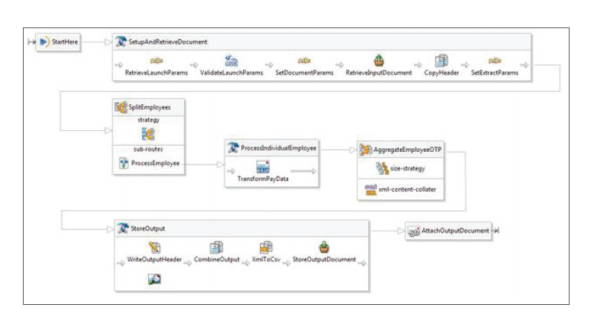
Aimed at skilled developers and offered as a set of plug-ins to the Eclipse IDE, Workday Studio offers a rich, graphical development environment in which a user can drag and drop a variety of reusable components that handle the “plumbing” aspects of integration building, freeing you to focus on the critical business logic. 
Workday has been using this valuable tool for years to deliver all of our packaged integrations and connectors as well as the EIB.

Use Workday Studio to unlock the power of Workday’s integration infrastructure:• Run your Workday Studio integrations like any other Workday integration—configure, launch, schedule, monitor, and even audit your  integrations.

• Use powerful and productive development tools optimized for interacting with your Workday tenant 

• Build sophisticated and highly customizable integrations without the need to own or manage any on premise integration middleware or servers.


When to Use Workday Studio?

If the integration you want to develop has any one of the following characteristics, it is a good candidate for a Workday Studio integration:


• Multiple different data sources and/or delivery requirements

• Scalable and efficient processing of potentially very large data sets (up to tens of    gigabytes)

• Complex looping or branching logic based on dynamic data or external variables

• Sophisticated change detection requirements

• Complex error scenarios and corresponding need to react differently to error conditions

• Need for rigorous source code control, unit testing, debugging, logging, and other formal development disciplines

• Need to extend with custom capabilities implemented in Java, Spring, or a third-party service

• Need to develop related integrations for other services which also offer an Eclipse-based development environment

Workday Integration Cloud Connect 

Workday Integration Cloud Connect consists of a growing number of packaged integrations and connectors to complementary solutions that are 100% built, supported, and maintained by Workday. The benefits of this approach to the customer are many, including access to a set of integrations that are:

• lower cost, lower risk, and faster to deploy without requiring any coding;

• fully supported by Workday and are certified and tested across updates and patches; and

•treated like any other part of the product, with a published product roadmap.

What Is a Packaged Integration? 

Workday offers customers complete packaged integration solutions that are built on an open, standards-based API and hosted within the Workday Cloud. This set of integration solutions is delivered, maintained, and supported by Workday and currently includes integration to 160+ benefit carriers, Kronos, TalentLink, Safeguard, Salesforce, Cybersource, and others. Packaged integrations allow customers to leverage their current investments without adding additional costs and overhead within their IT 
departments


What Is a Connector? 

In addition to packaged integrations, Workday also provides Connectors, which are slightly different from packaged integrations in that they provide a framework for building an integration of a certain type based on integration templates. Examples of Connectors include the Workday Payroll Interface, which reduces the time, cost, and complexity of integrating to third-party payroll providers. 

Connectors are configured integrations that generate an intermediate file output format that contains all the needed data and is subsequently transformed to (or 
from) a specific vendor format. For example, Workday generates a “Workday” format document, expressed as either XML or CSV, for connecting to a third-party 
payroll system that may not be offered as a packaged integration. In this case, you can then simply do the “last mile” yourself (using Workday’s integration tools), 
leveraging the packaged Connector, which already represents a large part of the effort.

Other Connectors, such as the ”Payment Connector” and the ”Punchout Connector,” are built to standards that are well structured and consistently adopted by third-party systems. In these cases, customers can configure these Connectors to work with any third-party system (e.g., a bank or supplier) that adheres to the standard. 

Integration Cloud Connect consists of the following six sub-networks:

 Cloud Connect for HCM - Extends Workday HCM by integrating to partners that provide capabilities including: recruiting, learning, time and attendance, and account provisioning (LDAP/Active Directory).

Cloud Connect for Benefits - Extends Workday HCM by providing integration to a growing catalog of benefits providers, including: health insurance, health and flexible spending accounts, retirement savings plans, life insurance, AD&D insurance, and 

COBRA administrators

• Cloud Connect for Workday Payroll

 Cloud Connect for Third-Party Payroll 

• Cloud Connect for Spend Management 

• Cloud Connect for Financials

Putting It All Together: Payments Example 

One of the first examples shipped with Workday Studio shows how to create a one-time-payments integration to a third-party payroll vendor. This sample combines a 
number of aspects of the integration approach that has been described in this document :

1. Use a packaged connector to define the behavior of 
the base one-time-payments integration.

2. Call this integration on a scheduled basis from within a business process.

3. Once the integration completes, forward a reference to the generated document to a second (Workday Studio built) integration, which further processes this output by transforming it into a new file format. 

4. Subsequent to this, and again from within the business process framework, initiate an approval and delivery sequence whereby the final file proposed for delivery to the payroll vendor can be reviewed and approved in a normal workflow.

5. Once approvals are complete, deliver the file to the configured third-party endpoint, again powered by the business process framework.

All of the above is fully logged and audited, and any 
issues or errors that arise along the way can readily be 
corrected and the process re-started.


Featured Post

WORKDAY STUDIO

What Is Workday Studio? Workday Studio is a powerful development tool  enabling customers and partners to build sophisticated  integr...